


Resume
Step 5: Publish
4-step open source tutorial to easily build your online resume and market yourself
Click the Git icon in the left sidebar - that is the icon with three connected circles as shown below.
Enter a description of the changes in the text box, such as 'edit author', and click Commit to save the changes to Git:
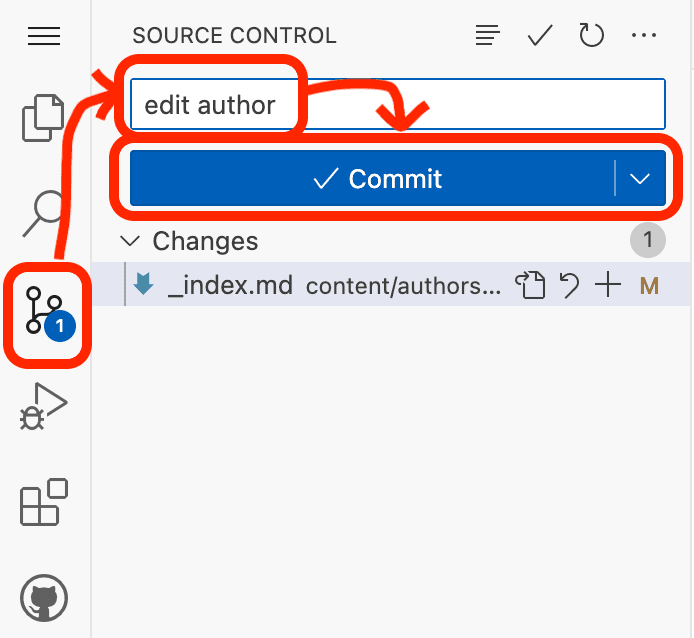
Click Yes in the popup to confirm you want to save un-staged changes.
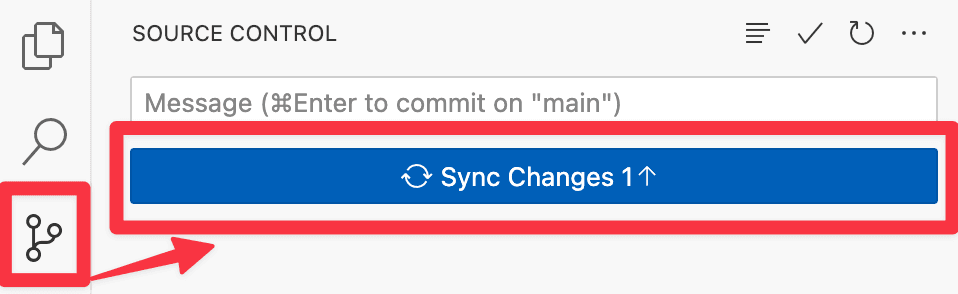
Then synchronise the changes to your GitHub repository by clicking Sync:
Was this page helpful?
Step 3: Auto Import Publications
4-step open source tutorial to easily build your online resume and market yourself
Step 1: Auto-Deploy
Launch your Link-in-Bio page in seconds with Ownable.
From the makers of
© 2026 Lore Labs.