Featured
Comparison Table
Win the comparison: a side-by-side feature matrix against competitors with your column highlighted and a CTA.
comparisoncompetitorsdifferentiation
18 optionsMIT



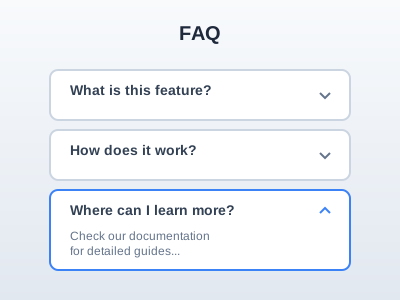
Answer last-minute objections in a clean accordion — place it before the final CTA where it lifts conversion.
Add it to any Hugo page's sections list — no build step.
Quick start
Drop this into your page's front matter, under the sections list. Edit the values, and HugoBlox renders the block — no build step.
- block: faq
  content:
    title: Frequently asked questions
    subtitle: Fast answers for new users
    text: If you do not see your question, open an issue or reach out.
    items:
      - question: How do I enable Pagefind?
        answer: Add `pagefind = true` to your config and run `pnpm build`.
      - question: Can I customize Tailwind tokens?
        answer: Yes. Edit the design tokens in `modules/blox-tailwind/assets/` and run `pnpm format`.
    button:
      text: View full knowledge base
      url: /faq/
      icon: hero/arrow-right
  design:
    spacing:
      padding:
        - 2.5rem
        - "0"
        - 2.5rem
        - "0"
Overview
Display frequently asked questions in an interactive accordion format with automatic FAQPage structured data for SEO.
Add to your page's front matter:
sections:
  - block: faq
    content:
      title: Frequently Asked Questions
      subtitle: Find answers to common questions
      text: Can't find what you're looking for? [Contact us](/contact)
      items:
        - question: What is HugoBlox Kit?
          answer: HugoBlox Kit is a no-code website builder framework powered by Hugo and Tailwind CSS.

        - question: Is it free to use?
          answer: Yes! HugoBlox Kit is open source and free to use under the MIT license.

        - question: How do I get started?
          answer: |
            Getting started is easy:
            1. Choose a template
            2. Click "Use Template"
            3. Customize your content
            4. Deploy to GitHub Pages or Netlify

      button:
        text: View All FAQs
        url: /faq/
        icon: arrow-right
    design:
      spacing:
        padding: ["6rem", "0", "6rem", "0"]
This block automatically generates FAQPage structured data for better SEO and eligibility for Google's FAQ rich results.
design.spacingdesign.background.colorReference
Every option the FAQ block accepts, generated from its schema.
Properties set under the block's content key.
| Property | Type | Default | Description |
|---|---|---|---|
title | string | — | Block title |
subtitle | string | — | Block subtitle |
text | string | — | Introductory text (Markdown supported) |
itemsrequired | object[] | — | FAQ items |
items[].question | string | — | The question |
items[].title | string | — | Alias for question |
items[].answer | string | — | The answer (Markdown supported) |
items[].text | string | — | Alias for answer |
button | object | — | Call-to-action button |
button.textrequired | string | — | Button text |
button.urlrequired | string | — | Button URL |
button.icon | string | — | Button icon name |
Properties set under the block's design key — shared background, spacing, and color settings apply on top.
| Property | Type | Default | Description |
|---|---|---|---|
spacing | object | — | — |
spacing.padding | string[] | 20px,0,20px,0 | Padding [top, right, bottom, left] |
spacing.padding_sm | string[] | 3rem,0 | Responsive padding for smaller screens [top, bottom] |
spacing.margin | string[] | 0,0,0,0 | Margin [top, right, bottom, left] |
Frequently asked
Ready to build with the FAQ block?
More blocks like this
Win the comparison: a side-by-side feature matrix against competitors with your column highlighted and a CTA.
Show what your product does in a scannable grid of icons, names, and benefit-led descriptions.
Numbered process steps in vertical, horizontal, or timeline layouts — for 'how it works' and onboarding.
Contact details, address, social links, and an optional form in a clean, modern card layout.