
Resume Awards
Awards and certifications in elegant cards, with optional links to the certificates.
resumeawardscertifications
3 optionsMIT




A profile introduction — avatar, bio, and social links — for a personal site or online CV.
Add it to any Hugo page's sections list — no build step.
Quick start
Drop this into your page's front matter, under the sections list. Edit the values, and HugoBlox renders the block — no build step.
- block: resume-biography
  content:
    username: me
    text: I build AI research tooling and mentor applied ML teams.
    button:
      url: /cv.pdf
      text: Download CV
  design:
    avatar:
      size: large
      shape: circle
    banner:
      filename: banners/lab.jpg
    biography:
      style: "max-width: 60ch;"
Overview
Make a powerful personal first impression
Present yourself professionally with the Resume Biography block - a comprehensive profile component that combines your photo, personal details, social presence, and biography into one compelling, trust-building section.
name.pronunciation in your author YAML)Professional Standards: Meets modern professional profile expectations with comprehensive information display
Visual Impact: High-quality imagery and clean layout create strong first impressions
Social Connectivity: Integrated social links help build professional networks
Accessibility First: Inclusive features like pronunciation guides and pronoun support
Perfect for building authority, establishing credibility, and creating memorable personal brands. Whether you're building a personal website, company profile, or professional portfolio, the Resume Biography block ensures you make the right first impression.
Your professional story deserves professional presentation - create a biography section that opens doors and builds connections.
Flexibility
Switch the block's design with these presets — no custom CSS.
avatar.sizeAvatar display size. Sizes: small (150px), medium (200px), large (320px), xl (400px), xxl (500px). Images are generated at 2x for retina displays.avatar.shapeAvatar shapeReference
Every option the Resume Biography block accepts, generated from its schema.
Properties set under the block's content key.
| Property | Type | Default | Description |
|---|---|---|---|
username | string | me | Author username (references data/authors/{username}.yaml) |
text | string | — | Override biography text (Markdown); falls back to author profile bio when omitted |
button | object | — | Optional button beneath the bio |
button.urlrequired | string | — | — |
button.textrequired | string | — | Action label, 2-3 words. E.g. 'Download CV', 'View Resume'. |
Properties set under the block's design key — shared background, spacing, and color settings apply on top.
| Property | Type | Default | Description |
|---|---|---|---|
avatar | object | — | — |
avatar.size | small | medium | large | xl | xxl | medium | Avatar display size. Sizes: small (150px), medium (200px), large (320px), xl (400px), xxl (500px). Images are generated at 2x for retina displays. |
avatar.shape | circle | square | rounded | circle | Avatar shape |
banner | object | — | — |
banner.filename | string | — | Optional banner image filename in assets/media/ |
biography | object | — | — |
biography.style | string | — | Inline CSS style applied to the bio text wrapper |
Compose
Blocks that pair naturally with Resume Biography on the same page.
Frequently asked
Ready to build with the Resume Biography block?
More blocks like this
Awards and certifications in elegant cards, with optional links to the certificates.

A horizontal biography layout with banner and avatar, plus integrated education and interests.

A chronological timeline of work experience and education for a resume or CV.
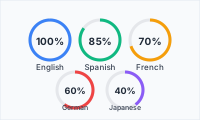
Language proficiency shown as clean circular progress indicators.