
Resume Awards
Awards and certifications in elegant cards, with optional links to the certificates.
resumeawardscertifications
3 optionsMIT




A horizontal biography layout with banner and avatar, plus integrated education and interests.
Add it to any Hugo page's sections list — no build step.
Quick start
Drop this into your page's front matter, under the sections list. Edit the values, and HugoBlox renders the block — no build step.
- block: resume-biography-3
  content:
    username: me
    text: Research lead focused on alignment, evaluations, and safety tooling.
    headings:
      about: Professional summary
      education: Education
      interests: Interests
    button:
      url: /cv.pdf
      text: Download CV
  design:
    avatar:
      size: large
      shape: circle
    name:
      size: lg
    banner:
      filename: banners/research.jpg
    biography:
      style: "max-width: 70ch;"
Overview
Comprehensive professional profile with integrated academic details
Present a complete professional picture with the Resume Biography 3 block - an expanded biography layout that combines personal information, social presence, education history, and interests in one cohesive, horizontally-oriented section.
Name sizing: Adjust the profile heading size to accommodate long names using design.name.size:
compact: space-friendly for long namesbalanced (default): matches the demo styledisplay: extra-large for short namesSection heading overrides: Customize any of the three main section headings using content.headings:
about: Biography section heading (default: "Professional Summary" from i18n about_me)education: Education section heading (default: from i18n education)interests: Interests section heading (default: from i18n interests)Example front matter:
block: resume-biography-3
content:
  headings:
    about: Research Profile
    education: Academic Background
    interests: Research Areas
design:
  name:
    size: compact
name.pronunciation in your author YAML)Complete Picture: Combines biography, education, and interests for comprehensive professional presentation
Space Efficient: Horizontal layout maximizes content display while maintaining readability
Academic Focus: Integrated education section perfect for academic and research professionals
Personal Touch: Interests section adds humanity to professional profiles
Perfect for academics, researchers, consultants, and professionals who want to present a complete picture of their background, education, and interests in one comprehensive, beautifully designed section.
Create a professional profile that tells your complete story and opens doors to new opportunities.
Flexibility
Switch the block's design with these presets — no custom CSS.
avatar.sizeAvatar display size. Sizes: small (150px), medium (200px), large (320px), xl (400px), xxl (500px). Images are generated at 2x for retina displays.avatar.shapeAvatar shapename.sizeHeading size for the profile name. Responsive sizing from xs (text-xl to text-3xl) up to xl (text-5xl to text-7xl).Reference
Every option the Resume Biography 3 block accepts, generated from its schema.
Properties set under the block's content key.
| Property | Type | Default | Description |
|---|---|---|---|
username | string | me | Author username (references data/authors/{username}.yaml) |
text | string | — | Biography text override (supports Markdown). Defaults to the author profile bio. |
headings | object | — | Optional custom headings for sections |
headings.about | string | — | Heading for biography section (default: Professional Summary) |
headings.education | string | — | Heading for education section (default: i18n 'education') |
headings.interests | string | — | Heading for interests section (default: i18n 'interests') |
button | object | — | Optional call-to-action button |
button.urlrequired | string | — | Button URL |
button.textrequired | string | — | Button text |
Properties set under the block's design key — shared background, spacing, and color settings apply on top.
| Property | Type | Default | Description |
|---|---|---|---|
avatar | object | — | Avatar styling options |
avatar.size | small | medium | large | xl | xxl | large | Avatar display size. Sizes: small (150px), medium (200px), large (320px), xl (400px), xxl (500px). Images are generated at 2x for retina displays. |
avatar.shape | circle | square | rounded | circle | Avatar shape |
banner | object | — | Optional banner image |
banner.filename | string | — | Banner image filename (in assets/media/) |
biography | object | — | Biography text styling |
biography.style | string | — | Custom CSS styles for biography text |
name | object | — | Profile name typography controls |
name.size | xs | sm | md | lg | xl | lg | Heading size for the profile name. Responsive sizing from xs (text-xl to text-3xl) up to xl (text-5xl to text-7xl). |
Compose
Blocks that pair naturally with Resume Biography 3 on the same page.
Frequently asked
Ready to build with the Resume Biography 3 block?
More blocks like this
Awards and certifications in elegant cards, with optional links to the certificates.

A profile introduction — avatar, bio, and social links — for a personal site or online CV.

A chronological timeline of work experience and education for a resume or CV.
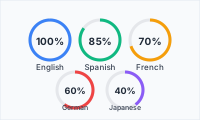
Language proficiency shown as clean circular progress indicators.